DateTimeFormatter类使用方法与日期时间格式化详解
时间:2026-08-18 | 作者:318050 | 阅读:0除了DataFormat和SimpleDateFormat这两个类,JDK 8还在ja va.time.format包下提供了DateTimeFormatter。
这个类同样是专门做格式化的,可以理解为把DataFormat和SimpleDateFormat的能力整合到了一起。
一方面,它能把日期、时间对象格式化成字符串;另一方面,也能把符合特定格式的字符串再解析回日期、时间对象。
DateTimeFormatter对象的获取方式
要使用DateTimeFormatter进行格式化或者解析,就必须先获得DateTimeFormatter对象。
获取DateTimeFormatter对象有三种方式,具体如下:
使用静态常量创建DateTimeFormatter格式器。在DateTimeFormatter类中包含大量的静态常量,如BASIC_ISO_DATE、ISO_LOCAL_DATE、ISO_LOCAL_TIME等,通过这些静态常量都可以获取DateTimeFormatter实例。
使用不同风格的枚举值来创建DateTimeFormatter格式器。在FormatStyle类中定义了FULL、LONG、MEDIUM和SHORT四个枚举值,它们表示日期和时间的不同风格。
根据模式字符串创建DateTimeFormatter格式器。
了解了DateTimeFormatter的作用及其对象获取方式后,下面分别讲解下如何使用DateTimeFormatter来格式化和解析日期、时间。
1.完成日期、时间格式化
使用DateTimeFormatter将日期、时间格式化为字符串,可以通过以下两种方式:
真正执行格式化时,需要调用DateTimeFormatter的format(TemporalAccessor temporal)方法。这里的参数temporal是TemporalAccessor接口类型,常见的主要实现类包括LocalDate和LocalDateTime。
调用LocalDate、LocalDateTime等日期、时间对象的format(DateTimeFormatter formatter)方法执行格式化。
接下来通过一个案例来演示,如何使用DateTimeFormatter来格式化日期、时间,如文件1所示。
文件1 Example28.ja va
 1    import ja va.time.*;
 2    import ja va.time.format.*;
 3    public class Example28 {
 4        public static void main(String[] args) {
 5            LocalDateTime date = LocalDateTime.now();
 6            // 1、使用常量创建DateTimeFormatter
 7            System.out.print("使用常量创建DateTimeFormatter:");
 8            System.out.println(DateTimeFormatter
 9                                          .ISO_LOCAL_DATE.format(date));
 10            // 2、使用Long类型风格的DateTimeFormatter
 11            System.out.print("使用Long类型风格的DateTimeFormatter:");
 12            DateTimeFormatter dtf = DateTimeFormatter
 13                                       .ofLocalizedDateTime(FormatStyle.LONG);
 14            System.out.println(dtf.format(date));
 15            // 3、根据模式字符串来创建DateTimeFormatter格式器
 16            System.out.print("根据模式字符串来创建DateTimeFormatter:");
 17            DateTimeFormatter formatter = DateTimeFormatter
 18                                       .ofPattern("yyyy MM dd HH:mm:ss");
 19            // 使用LocalDateTime的format()方法格式化
 20            String text = date.format(formatter);
 21            // 使用格式化程序解析文本,返回日期时间
 22            LocalDateTime parsedDate = LocalDateTime.parse(text, formatter);
 23            System.out.println(parsedDate);
 24        }
 25    }
运行结果如图1所示。
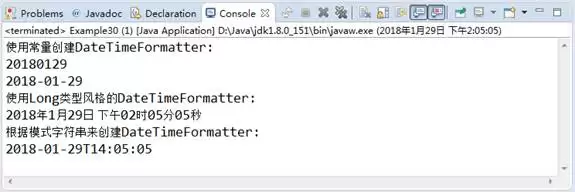
图1 运行结果
文件1中,分别使用三种方式创建了DateTimeFormatter格式器。
随后,使用不同方式创建的格式器对LocalDateTime进行格式化。
2.解析字符串
要使用DateTimeFormatter将指定格式的字符串解析成日期、时间对象,可以通过日期时间对象所提供的parse(CharSequence text, DateTimeFormatter formatter)方法来实现。
下面通过一个具体的案例来演示,如何使用DateTimeFormatter解析日期、时间,如文件2所示。
文件2 Example29.ja va
 1    import ja va.time.*;
 2    import ja va.time.format.*;
 3    public class Example29 {
 4        public static void main(String[] args) {
 5            // 定义两种日期格式的字符串
 6            String str1 = "2018-01-27 12:38:36";
 7            String str2 = "2018年01月29日 15时01分20秒";
 8            // 定义解析所用的格式器
 9            DateTimeFormatter formatter1 = DateTimeFormatter
 10                                 .ofPattern("yyyy-MM-dd HH:mm:ss");
 11            DateTimeFormatter formatter2 = DateTimeFormatter
 12                                 .ofPattern("yyyy年MM月dd日 HH时mm分ss秒");
 13            // 使用LocalDateTime的parse()方法执行解析
 14            LocalDateTime localDateTime1 = LocalDateTime
 15                                                       .parse(str1, formatter1);
 16            LocalDateTime localDateTime2 = LocalDateTime
 17                                                       .parse(str2, formatter2);
 18            // 输出结果
 19            System.out.println(localDateTime1);
 20            System.out.println(localDateTime2);
 21        }
 22    }
运行结果如图2所示。

图2 运行结果
在文件2中,首先定义了两种日期格式的字符串。
然后通过DateTimeFormatter对象定义了解析不同格式字符串的格式器。
接下来,通过LocalDateTime的parse()方法对字符串进行解析。
最后,使用输出语句输出解析后的结果。

来源:整理自互联网
免责声明:文中图文均来自网络,如有侵权请联系删除,心愿游戏发布此文仅为传递信息,不代表心愿游戏认同其观点或证实其描述。
相关文章
更多-
- DateFormat类用法详解与日期格式化指南
- 时间:2026-08-18
-
- Java Collection接口详解与常见用法指南
- 时间:2026-08-18
-

- ArrayList集合详解与常见用法指南
- 时间:2026-08-18
-

- List接口详解:特点、用法与常见实现类
- 时间:2026-08-18
-
- LinkedList集合详解与常见用法介绍
- 时间:2026-08-18
-
- Iterator遍历集合的方法与使用技巧
- 时间:2026-08-18
-
- JDK8中foreach遍历集合的用法与示例
- 时间:2026-08-18
-
- foreach遍历集合的用法与常见问题解析
- 时间:2026-08-18
精选合集
更多大家都在玩
热门话题
大家都在看
更多-

- 智能LOGO设计神器:像私人设计师一样快速完成LOGO设计
- 时间:2026-08-17
-

- 百度AI探索版是什么:新一代AI搜索引擎解析
- 时间:2026-08-17
-
- Android开发入门学习路线:从零开始快速上手
- 时间:2026-08-17
-

- 司马阅SmartRead AI阅读神器:文档对话提问即得答案
- 时间:2026-08-17
-

- 通义智文阅读功能介绍:支持网页论文图书与自由阅读
- 时间:2026-08-17
-

- Atom如何配置Kotlin开发环境并编写Kotlin代码
- 时间:2026-08-17
-

- Kotlin中直接调用函数与invoke()用法区别及适用场景
- 时间:2026-08-17
-
- CentOS下Rust项目版本控制方法与实践
- 时间:2026-08-17