SpringBoot集成Spring AI Alibaba工具调用实战指南
时间:2026-08-21 | 作者:游戏探长 | 阅读:0前言
简单来说,这篇教程讲的是如何让大模型在对话过程中,主动调用你写好的 Ja va 方法。
比如查个时间、查个天气,完全不需要手动干预。大模型会自己判断什么时候该调用哪个工具,再把结果组织成自然语言回复给你。
版本信息
- Spring Boot:
3.4.5 - spring-ai-alibaba-starter-dashscope:
1.1.2.1 - Ja va:
17
另外,Spring-ai 更新速度很快。建议始终以官方文档为准,这里给出的版本在写文时是稳定的。
一、依赖引入
首先,引入必要的 Ma ven 依赖。
核心依赖是 spring-ai-alibaba-starter-dashscope。它封装了阿里云 DashScope 的调用。
另外需要留意 dashscope-sdk-ja va 可能带旧版 jsonschema-generator。这会与 Spring-ai 自带的版本冲突,所以最好在 dependencyManagement 里统一指定版本。
同时,排除 slf4j-simple,避免与 Boot 自带的 logback 双绑。
    org.springframework.boot
    spring-boot-starter-web


    com.alibaba.cloud.ai
    spring-ai-alibaba-starter-dashscope
    1.1.2.1


            com.github.victools
            jsonschema-generator
            4.38.0


    com.alibaba
    dashscope-sdk-ja va
    2.22.18


            org.slf4j
            slf4j-simple
二、yml 配置
接下来,在 application.yml 中配置 DashScope 的 API Key 和模型参数。
注意:Tool Calling 需要选择支持该能力的对话模型,比如 qwen-max。
温度设为 0.7,是个比较平衡的取值。
spring:
  application:
    name: spring-tool-demo
  ai:
    dashscope:
      api-key: ${DASHSCOPE_API_KEY}
      chat:
        options:
          # 需支持 Tool Calling 的对话模型
          model: qwen-max
          temperature: 0.7
三、代码案例:声明式工具(@Tool)
1. 日期工具
核心思路是用 @Tool 注解标记一个方法,并交给 Spring 管理。
这样模型就能识别并调用它。
这里第一个工具用来获取当前时间。其中 description 属性非常关键,模型靠它判断“什么时候该调这个工具”。
工具名默认就是方法名 getCurrentDateTime。
@Component  // 交给 Spring 管理,便于注入到 ChatClient
public class DateTool {

    /**
     * description 很重要:模型靠它判断「什么时候该调这个工具」。
     * 工具名默认是方法名 getCurrentDateTime。
     */
    @Tool(description = "Get the current date and time in the user's timezone")
    public String getCurrentDateTime() {
        // 返回给模型的真实数据;模型再组织成自然语言回复用户
        return DateFormatUtil.now(); // 例如 yyyy-MM-dd HH:mm:ss
    }
}
2. 天气工具(普通业务方法 + @Tool)
第二个工具演示如何查询指定城市的天气。
这里用拼音作为参数,比如 beijing、shanghai。这样更方便模型稳定传参。
实际项目中,你可以换成调用第三方天气 API。
@Component
public class WeatherTool {

    /**
     * 查询指定城市天气。
     * district 建议用拼音,如 beijing / shanghai,方便模型稳定传参。
     */
    @Tool(description = "查询指定城市的天气情况")
    public String getWeather(String district) {
        // 这里用 switch 模拟业务;真实项目可调第三方天气 API
        return switch (district) {
            case "beijing" -> "天气清凉";
            case "shanghai" -> "天气炎热";
            case "guangzhou" -> "天气闷热";
            default -> "未知地区";
        };
    }
}
四、注册到 ChatClient(defaultTools)
工具写好后,还需要注册到 ChatClient。
这里使用 defaultTools 方法,将工具实例传入。这样每次对话,Client 都会自动携带这些工具,省去每次手动指定。
注意:如果你已经在 defaultTools 注册了,就不要在单次请求里再用 .tools() 重复传。
否则会报“Multiple tools with the same name”的错误。
@Configuration
public class ClientConfig {

    /**
     * 构建带默认工具的 ChatClient。
     * defaultTools:该 Client 每次对话都可用这些工具。
     */
    @Bean(name = "toolClient")
    public ChatClient toolClient(DashScopeChatModel chatModel,
                                 DateTool dateTool,
                                 WeatherTool weatherTool) {
        return ChatClient.builder(chatModel)
                // 传入带 @Tool 方法的对象实例即可,框架会扫注解并生成 Schema
                .defaultTools(dateTool, weatherTool)
                .build();
    }
}
注意:若已在 defaultTools 注册,请求里不要再写 .tools(new DateTool()),否则会报:
Multiple tools with the same name (getCurrentDateTime) found
defaultTools 与单次 .tools() 二选一,或确保工具名不重复。
五、Controller 调用
1. 查当前时间
先看一个最简单的调用。
用户说“要当前时间”,模型就会自动调用 getCurrentDateTime,然后把返回的时间戳组织成自然语言回答。
这里不要再写 .tools(...),因为工具已经在 defaultTools 里注册好了。
@RestController
public class TestController {

    @Resource(name = "toolClient")
    private ChatClient toolClient;

    /**
     * GET /get/currenttime
     * 用户说「要当前时间」→ 模型决定调用 getCurrentDateTime → 把结果组织成回答
     */
    @GetMapping("/get/currenttime")
    public String getCurrentTime() {
        return toolClient.prompt()
                .system("You are a helpful assistant.")
                .user("Get the current date and time in the user's timezone")
                // 不要再 .tools(...),工具已在 defaultTools 里
                .call()
                .content();
    }
}
2. 查天气
天气查询稍微复杂一点,因为需要把中文城市名转成拼音参数。
这里在 system 提示里明确告诉模型:中文请转换成拼音作为调用工具的参数。
比如用户说“查一下上海的天气”,模型就会把“上海”转成 shanghai,再传给 WeatherTool.getWeather。
@RestController
public class WeatherController {

    @Resource(name = "toolClient")
    private ChatClient toolClient;

    /**
     * GET /get/weatherdistrict=上海
     * system 提示把中文城市转成拼音参数,和 WeatherTool 的 case 对齐
     */
    @GetMapping("/get/weather")
    public String getWeather(@RequestParam String district) {
        return toolClient.prompt()
                .system("你可以通过工具获取天气情况,"
                        + "中文请转换成拼音作为调用工具的参数,例如上海对应'shanghai'")
                .user("查一下" + district + "的天气")
                .call()
                .content();
    }
}
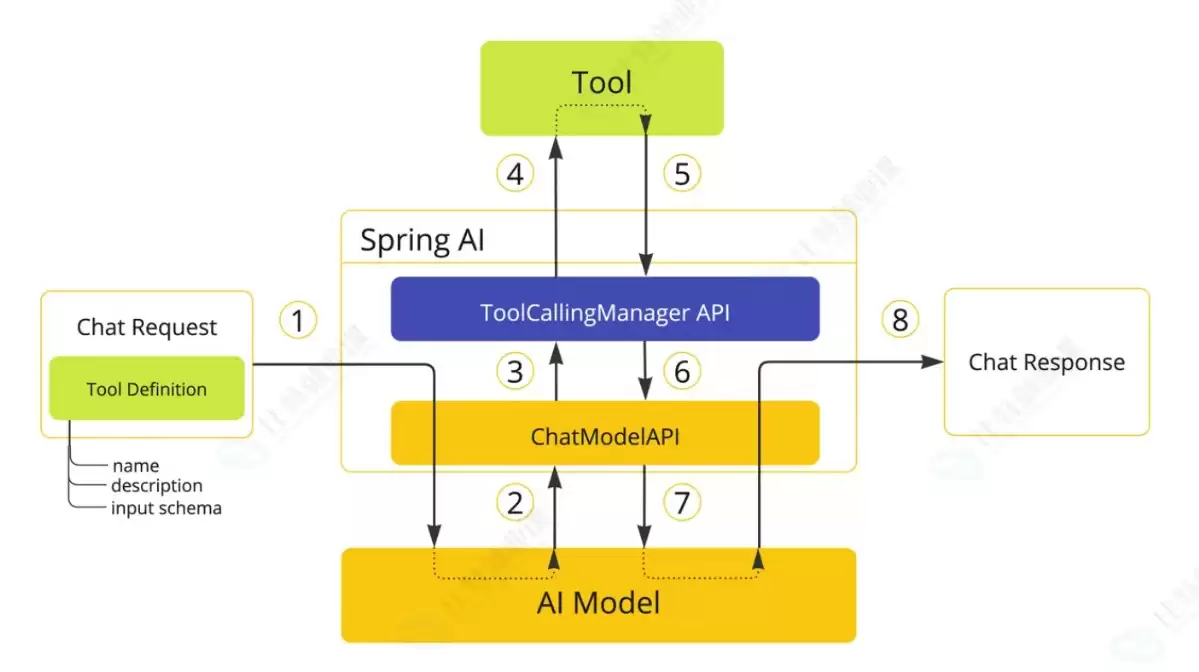
六、调用流程
整个调用流程如下图所示。
- 用户发起请求
- 模型判断需要调用哪个工具
- 执行对应方法
- 返回结果
- 模型再组织成自然语言回复给用户

免责声明:文中图文均来自网络,如有侵权请联系删除,心愿游戏发布此文仅为传递信息,不代表心愿游戏认同其观点或证实其描述。
相关文章
更多-

- Spring IOC控制反转入门与实战教程
- 时间:2026-08-18
-

- LangGraph控制流实战教程详解
- 时间:2026-07-28
-

- LangGraph状态管理与invoke入参深度解析实战教程
- 时间:2026-07-26
-

- 最新Codex第三方API配置实战教程
- 时间:2026-07-20
-

- 讯飞听见实时语音转写API开发实战教程
- 时间:2026-07-13
精选合集
更多大家都在玩
大家都在看
更多-

- 糖尿病完全不能吃糖吗
- 时间:2026-09-15
-
- 蚂蚁庄园小课堂2026年9月16日最新题目答案
- 时间:2026-09-15
-
- 小鸡答题今天的答案是什么2026年9月16日
- 时间:2026-09-15
-
- 蚂蚁庄园每日答题答案2026年9月16日
- 时间:2026-09-15
-
- 以下哪种粮食是酿造绍兴黄酒的主要原料 蚂蚁庄园今日答案9月16日
- 时间:2026-09-15
-
- 劝学名句“及时当勉励,岁月不待人”出自哪位诗人 蚂蚁庄园今日答案9.16
- 时间:2026-09-15
-
- 蚂蚁庄园今天答题答案2026年9月16日
- 时间:2026-09-15
-
- 蚂蚁庄园答题今日答案2026年9月16日
- 时间:2026-09-15