postman怎么传数组?postman传数组详细步骤
时间:2026-02-27 | 作者: | 阅读:0postman怎么传数组postman传数组详细步骤
1、首先打开【Postman】软件,将【Postman】发送方式改为【Post】。
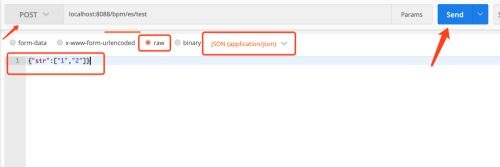
2、然后将【Postman】选择【raw】并且数据传输为json格式【application/json】。
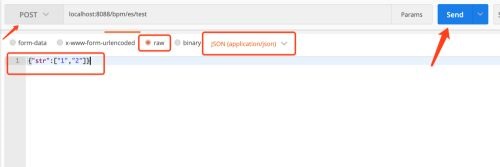
3、接着在下方输入json格式的数据。并点击【Send】。
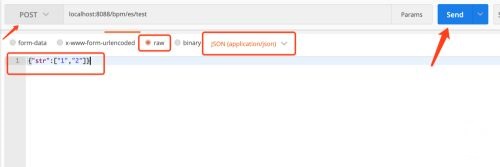
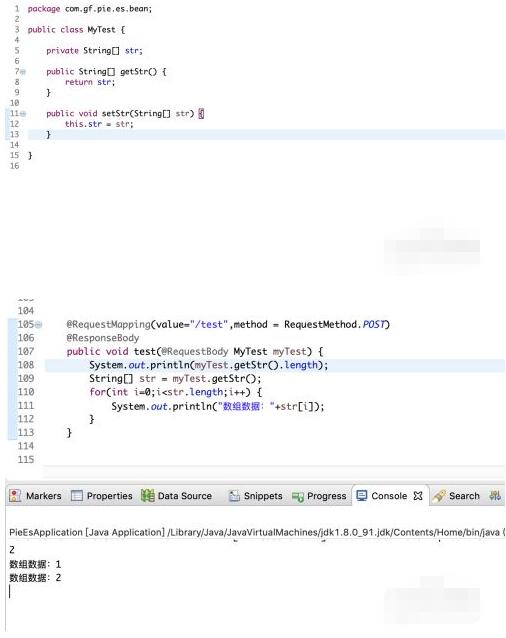
4、以java后台接收数据为例:
方式1:
使用String,来接收数组。
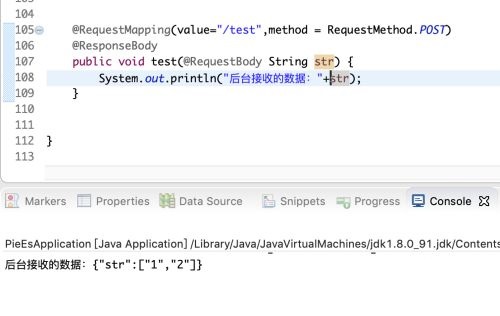
5、以java后台接收数据为例:
方式2:
使用实体类数组字段来接收数组。
希望这篇postman传数组详细步骤能帮助到大家!更多教程请关注心愿游戏!

来源:https://www.downza.cn/xy/154739.html
免责声明:文中图文均来自网络,如有侵权请联系删除,心愿游戏发布此文仅为传递信息,不代表心愿游戏认同其观点或证实其描述。
相关文章
更多-
- Postman批量运行测试用例操作指南
- 时间:2026-06-02
-

- Postman SSL证书过期解决方法教程
- 时间:2026-05-30
-
- Postman导出接口文档的详细步骤与分享方法
- 时间:2026-05-30
-

- Postman黑色主题设置方法与步骤详解
- 时间:2026-05-17
-

- Postman发送JSON参数详细步骤与技巧
- 时间:2026-05-17
-

- Postman备份数据恢复方法详细步骤指南
- 时间:2026-05-17
-

- Postman新建窗口详细步骤与快捷键教程
- 时间:2026-05-17
-
- Postman接口测试入门教程:从零到一掌握API调用
- 时间:2026-05-17
精选合集
更多大家都在玩
大家都在看
更多-

- 谷歌浏览器搜索框输入反应迟钝延迟是什么原因
- 时间:2026-06-22
-

- 米侠浏览器无法识别m3u8视频流的原因解析
- 时间:2026-06-22
-

- 微信发私密朋友圈的正确操作步骤
- 时间:2026-06-22
-

- 如何找回vivo浏览器里误删后的离线视频文件
- 时间:2026-06-22
-

- 淘宝半价活动抢购技巧与下单显示常见问题详解
- 时间:2026-06-22
-

- 爱作业更换头像方法步骤
- 时间:2026-06-22
-

- 谷歌浏览器开发者工具抓取XHR请求参数教程
- 时间:2026-06-22
-

- 淘宝直播流量券使用操作步骤详细教程
- 时间:2026-06-22